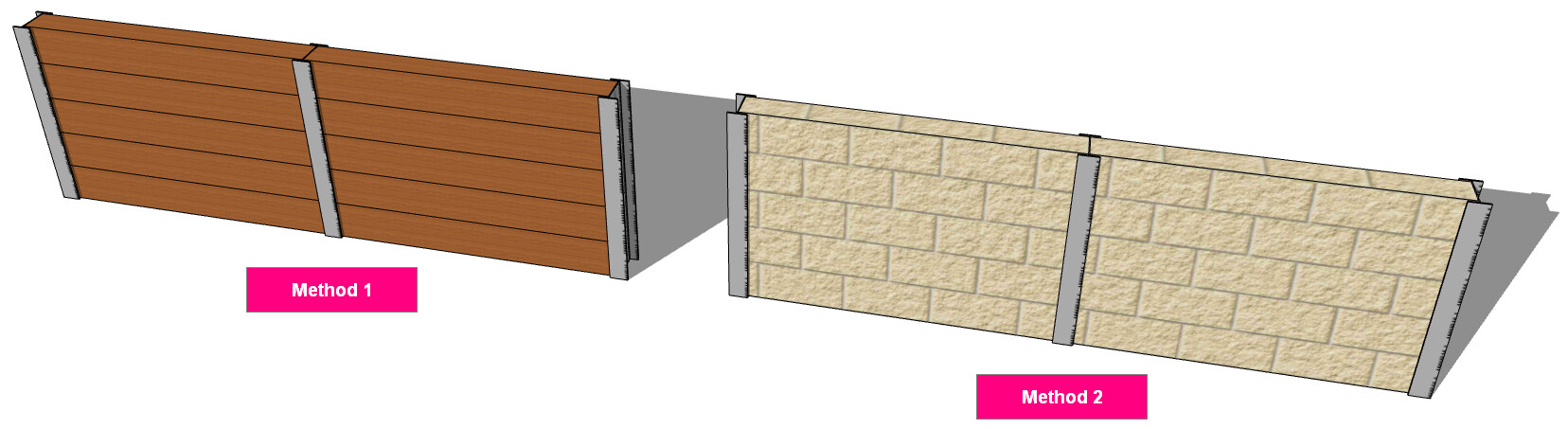
I’m wanting to model some retaining walls, specifically with steel verticles like c section, h section etc.
Is there a way I can do that so I can model it and do a take off from it?
I’m wanting to model some retaining walls, specifically with steel verticles like c section, h section etc.
Is there a way I can do that so I can model it and do a take off from it?
Hi user84,
I would recommend following these steps to create the retaining wall you’re after. Hope this helps! 
Step 1: Use the  Beam Tool to create the C/H Section verticals by using the desired Profile/Type.
Tips:
Step 2: Use one of the following methods (pending the required conctruction) to create the parts of the retaining wall between the verticals.
Beam Tool to draw horizontal panels/beams (e.g. timber or concrete sleepers) if you want to estimate the lineal length of each panel/beam.
 Wall Tool to draw the section(s) between the verticals if you want to estimate the area of these sections (e.g. masonry). Note: In the PlusDesignBuild
  Takoff Tool you can get an exact number of items from this area (i.e. how many bricks/blocks needed).
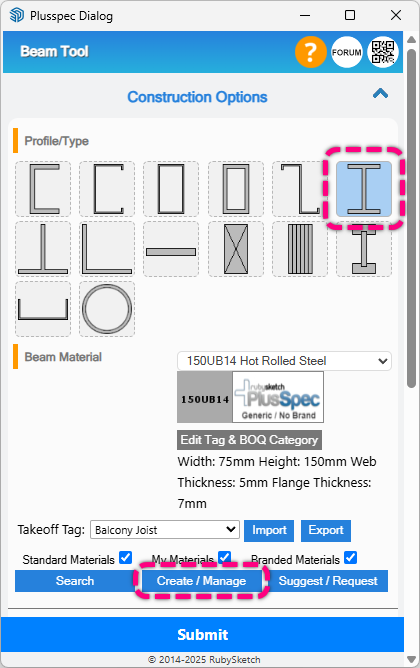
I can’t find any steel In my beam tool that I can use for the retaining wall, how did you get your steel in the image?
The steel beams I used are located under the Universal Beam category in the Beam Tool (outlined in the image below). If the beam size(s) you need aren’t available in the list, you can create your own materials by clicking on the Create / Manage button located below the material field (outlined in the image below) & following the steps.