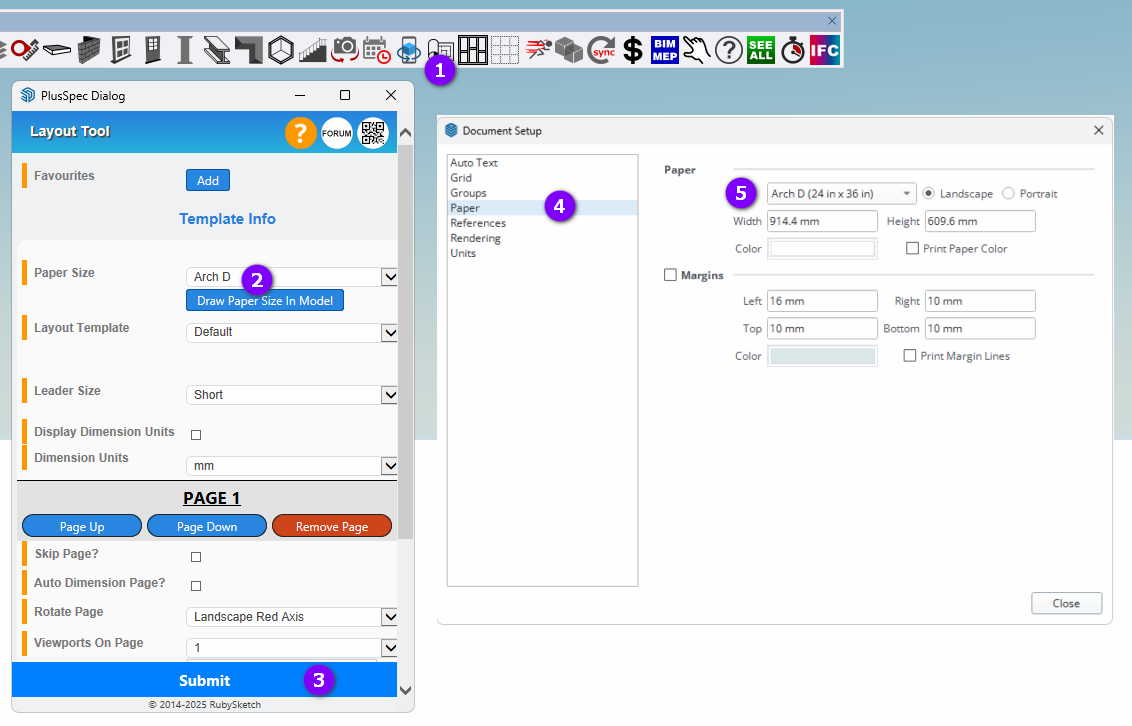
It seems the scene tool used to have a paper size option. I do not see how to format scenes to other paper sizes. Tabloid is setup, needing arch D
Thanks in advance
It seems the scene tool used to have a paper size option. I do not see how to format scenes to other paper sizes. Tabloid is setup, needing arch D
Thanks in advance
Hi fshrs,
I’m not aware of the  Scene Tool ever having a paper size option, however the
  Layout Tool &
  Frame Panelization Tool both have options for paper size (only the Layout Tool can draw a paper size in the model).
If you don’t mind me asking, what’s the reason you’re wanting to format scenes to paper sizes? In my experience, the paper size, scale & other things like this are best handled inside of Layout.
Please note that I’ve just found a small bug in the Layout Tool where the result of using the ‘Draw Paper Size In Model’ button isn’t correct for some paper sizes. I’ve passed this onto the development team to fix.
Good Day Grant,
I’ve been away from plus design build for a bit so my memory my be off. It seems I had an option previously to select paper size in plusspec scene tool or possibly another tab. I had a forum post in February 2024 with issues of sending arch D document to layout. I received a patch that cured the issue.
I worked on page setup today and have the steps in Layout to setup arch D. I created a smaller design last week that prints on tabloid 1/8 scale. I have a larger drawing this week that needs to be 1/4” scale and arch D. When I opened layout, it was sent straight to layout on tabloid, not opening the template page first. When I first changed paper size in layout, I had the arch D page with my document overlayed on that page on tabloid. I changed the viewport of the tabloid and extended it to the arch D borders. I’ve gone through all the printer, page setup etc to preset to 24” paper.
Thanks for your reply, you guys are great.
Pretty sure this is in reference to the layout tool, not the scene tool. Either that or the 2D tool with the onclick paper size change that ensures scenes are created to a minimum page size?