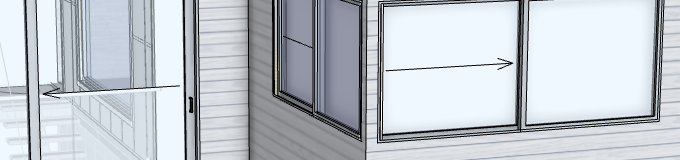
Hi Some of my windows are not showing as clear Glass! as per pasted drawing, the door on the left has clear glass but the two on the right have what appears to be frosted or opaque glass! what am i missing?
Good day Bostonalchemist,
Thank you for reaching out. That is a great question. To make edits to the glazing on your windows. Right-click (with your mouse) on the specific window you wish to change to open up the menu (as pictured)
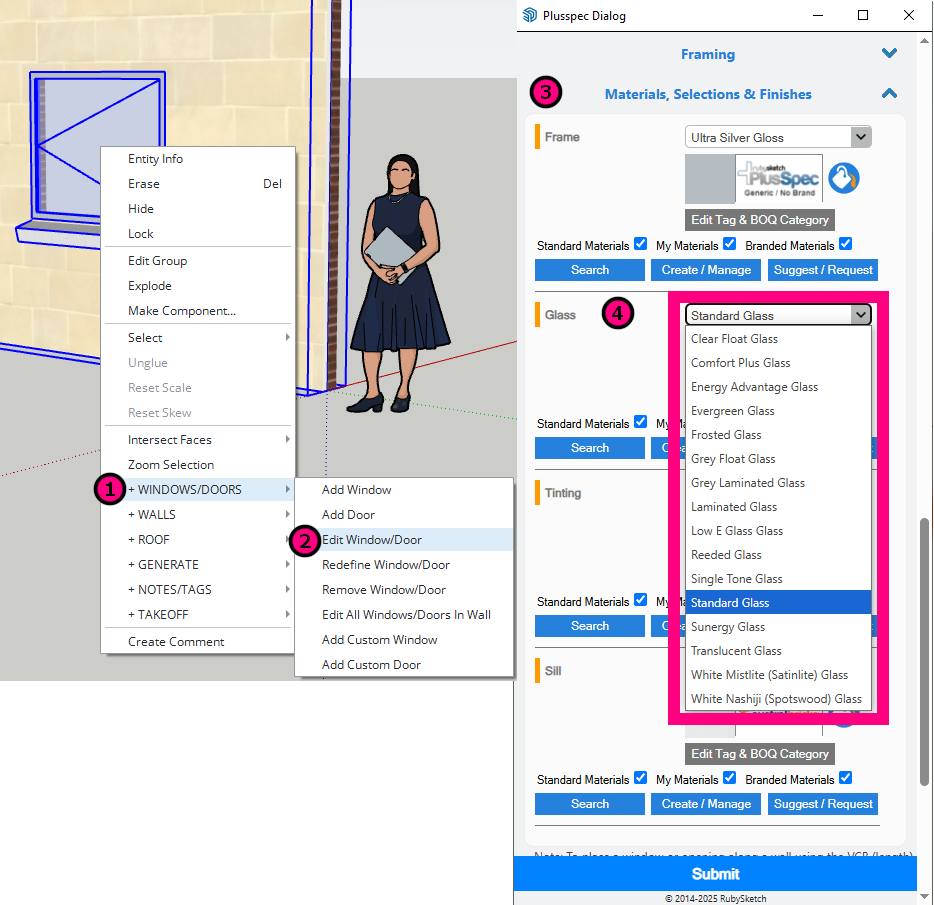
Instructions as per image
- Select +Windows/Doors
- Edit Window/Door
- Go to Materials, Selections & Finishes in the dialog and expand selection.
- Select the preferred glazing option under Glass, then select **Submit
**
To reduce double handling when creating your windows, select your preferred glass before creating them in your walls as per instructions 3) & 4) above.
Thank you
Hi Bostonalchemist,
I believe this could be due to the opening not cutting through the internal lining skin properly, which can sometimes happen when openings are placed too close to a corner or end of a wall.
Here are two options to resolve the issue.
- Move the two windows away from the corner by 20mm (this should be sufficient but you can try less).
- Turn off the internal lining tag (i.e. 26_INTERNAL_FINISHES - if the tag hasn’t been modified). Note:This result will only be correct whilst looking at the exterior of the building.